
Fertilizer shop
Urea, DAP, complex — fast billing, packet stock, follow-up for village credit customers.
For fertilizer · seed · pesticide shops
Your digital shop ledger — billing, credit, stock and reports in one place.
AgroKhata™ is simple computer / online software for agro dealers. Rely less on notebooks and memory: create bills at the counter, see farmer pending, know what you owe companies, track stock + expiry, and give your CA clean data.

In simple words: AgroKhata™ = your agro shop's online ledger + stock book + report book. On computer or phone. Your private link. Daily counter work made easy.
Live ERP · sample data
Full shop software with sample bills, stock, farmers, and reports. Click around like a real dealer — no signup, no payment.
Opens demo.agrokhata.com · sample data only
What is this website?
This site is the public page for AgroKhata™. AgroKhata™ is the software you use every day to run a fertilizer, seed, or pesticide shop. Think — billing book + stock register + customer ledger + company ledger + report file — all in one system, on your login.
Urea, DAP, complex — fast billing, packet stock, follow-up for village credit customers.
Crop-wise seed sales, company stock, village-wise farmer list, complaint tracking when needed.
Expiry-tracked stock, company returns, damaged / lost register, clear daily sales.
Billing book vs AgroKhata™
Many dealers still run the shop with only a billing book, ledger, and memory. Fine for a small shop. When sales, credit, and stock grow — time and mistakes grow too. Simple detail + examples below.
Handwriting, hunting pages, relying on memory — time goes here, mistakes hide, and real shop numbers stay unclear.
In season you write bills quickly. A page tears, ink smears, or the old book goes into a cupboard. Two or three months later a farmer says “this bill is wrong” — finding that page can take 1–2 hours, or the page is gone.
Example: March book missing → dispute never settled.
Written in the credit book, then half forgotten. Staff changes and “did they pay ₹2,000?” — unclear. Collection becomes guesswork, pending slowly grows.
Example: 40 credit customers — exact balance hard to count from a notebook.
Exact remaining stock per company product is unknown. Sometimes over-order, sometimes stock runs out. Expiry packets show up late — when loss has already started.
Example: 8 bags visible in warehouse, 14 in the book — no match.
Purchase bills, partial payments, returns — spread across notebook and WhatsApp. Month end question: “How much do we owe the company?” Answer depends on which book you checked last.
Example: Two notebooks + 5 WhatsApp bills = confusion.
Adding sales, matching cash, credit list, writing summary — 1–2 hours after shop closes. One wrong line and you recheck the whole page.
Example: Shop closed at 8, still tallying at 10 — exhausted.
Re-typing sales and purchases in Excel, photocopies, dictation. Missing entries, wrong dates, incomplete expenses — your time and the CA's time wasted every month.
Example: 3 days building Excel, then CA says data is incomplete.
Wrong rate, wrong packet, bill changed later — almost invisible in a notebook. Who created or changed the bill — little clear proof.
Example: Rate written ₹480, should be ₹520 — who catches it first?
You know “season was busy”, but which product made money, which village comes back, whether margin is right — decisions on feel alone.
Example: Seeds sold well, but which crop / company? Pulling from the book is slow.
Software handles writing, adding, searching, and reporting. Your team spends time on farmers, collection, and stock — not rewriting books.
Bill in seconds — not minutes
Select product / packet → save. Rate and amount stay correct. Line moves fast in peak season. Farmer gets a clear digital record, not a torn slip.
Example: 50 bills a day — each one quick + saved.
See who owes in minutes
Outstanding list ranks unpaid farmers by amount. Full payment history per customer. Targeted collection calls — not chasing from memory.
Example: Pull top 10 pending list, WhatsApp / call.
Check live stock anytime
Received / sold / remaining — per company product. Nearby expiry alert comes early. Sell first or company return — less wastage, less panic counting.
Example: Expiry alert → moved 10 packets first.
No month-end re-adding
Purchases, payments, dues in company / agro-dealer ledger. Before payment, “how much to pay” is clear instantly. Plan the next order on the same number.
Example: Exact pending shown on screen before payment.
Save 1–2 hours daily
Sales, credit, cash picture comes from the system. Staff spend evenings on collections and next-day planning — not rewriting billing book totals.
Example: Shop closed → 15 minute check → home.
One ZIP — not days of Excel
Download sales + purchases + expenses for any date range. Hand to CA. Month-end stress drops because accounts are already set.
Example: 1 April–30 April ZIP → WhatsApp to CA.
Less rework, more trust
Digital entry reduces wrong rate / missing bills. Who created or changed a bill — visible. Useful when multiple staff work the counter.
Example: Wrong bill → which staff created it, known instantly.
Answers on charts — not all-night tallying
Sales, most-sold products, repeat customers, profit, expense — see what's running. Plan next stock / offer on numbers, not season feel alone.
Example: Order based on “last 30 days top product”.
Evening tallying, hunting old bills, unclear credit, stock guesswork, monthly CA stress — even when the shop is busy, time goes to accounts instead of the counter.
Fast bills, instant pending / company dues, live stock + expiry, one ZIP for CA — less manual work, clear numbers, more time at the counter.
One day — simple comparison
Same shop, same farmers — the difference shows in time and stress.
Inside details (like live ERP)
Below are the same flows used at the counter in a real agro ERP: new bill, invoice actions, WhatsApp to farmer, returns, credit screens, and reports. Simple language + full detail.
Name + phone search. If new, add details + village. WhatsApp opt-in tick.
Barcode scan or company → product select. Add rate / qty / lines.
Cash / UPI / split / bank. Paid now, partial, or later (due days).
Create sale → invoice. WhatsApp / Main Bill / PDF / print.
At the counter open + Add Sale. Search by customer name + phone / add new customer. Village (name, taluka, district, state) — system can create if missing. Reference person optional. Barcode scan auto-fills company + product + price. Discount ₹ or %. Payment mode: Cash, UPI, Cash+UPI split, Bank Transfer. Status: Pending / Completed / Partial. Add due days for auto expected payment date. Notes + old bill number (migration) too. Click Create sale — invoice number is assigned.
On the sales list each invoice has View / Edit / Complaint / Delete. Returns: Full Return, Partial Return, Multi Return. Open invoice: WhatsApp (send bill to farmer), Main Bill (detailed tax / ERP bill), Download PDF, Print receipt. HSN & GST toggle for tax detail. Product lines show company, type (seed / fertilizer), qty, price, status. Created by shows which staff made it.
WhatsApp opt-in checkbox on Add Sale: farmer can receive invoices / updates on WhatsApp. Consent is saved. Green WhatsApp button on invoice to share bill. Separate WhatsApp Inbox for customer threads, unread count, sync — reply / follow-up in one place.
Full / Partial / Multi return from sales row. Customer Returns screen shows total returns, qty (kg), total refund amount, export + analytics. Company Returns separate — goods back to supplier. Return lines don't get lost in a notebook.
Outstanding Customers: total outstanding, how many customers on dues, top due customer first. Customer Ledger for full statement. Outstanding Payables: supplier debit / credit / amount due / last transaction — clear before payment.
Sales Analytics: revenue, transactions, customers, line items, period compare. Most Sold Products, Seed Sales by Crop, Profit Reports. Nearby Expiry: expired + nearing packets, cost vs selling value. CA Export: sales invoices + purchase bills + expenses — one package for CA. Sold vs Remaining, Sales Detail & Audit, Repeat / New Customers.
How it helps every day
From morning billing to evening collection and month-end CA — the most common dealer tasks.
A farmer comes for urea, seed, or spray. + Add Sale → customer + phone + village. Barcode scan or product select. Cash / UPI / split / credit. Create sale — you get an invoice number.
Example: Barcode scan → company + product + price auto → bill saved.
Many shops sell on credit. The outstanding list shows who owes what. Due days / expected payment date can be set on each sale.
Example: Pending list shows top dues first — easy collection calls.
Send the invoice to the farmer on WhatsApp. Generate Main Bill, download PDF, print receipt. HSN & GST detail optional. Complaint button on invoice too.
Example: Paid cash bill → WhatsApp → invoice on farmer's phone.
Wrong product or return? Full Return, Partial Return, Multi Return on the invoice. Customer Returns shows refund totals. Company Returns are separate for suppliers.
Example: 1 packet return → Partial Return → stock + money adjusted.
How much came in, sold, and left. Nearby Expiry: expired + soon-to-expire packets, cost and selling value. Sell first or return to company.
Example: Packets nearing expiry in 30-day window listed + export.
Sales analytics, most sold, profit, repeat customers. CA Export: sales + purchases + expenses package. After payment you get a private shop link.
Example: Choose date range → download CA ZIP → send to accountant.
What's included
Everything below is in your AgroKhata™ shop login — no separate add-ons to buy.
Add Sale, barcode scan, invoice list, Main Bill / PDF / print, Full / Partial / Multi return.
Payment, outstanding list, village export, WhatsApp invoice to farmer.
Company + agro-dealer ledger — clear view of what you owe.
Received / sold / remaining + nearby expiry (expired + nearing) alerts.
Category-wise shop expenses, month compare — under control.
Sale, customer, stock, profit charts + CA ZIP (sales + purchases + expenses).
After payment you get a private link like yourshop.agrokhata.com — only your staff, your data.
Real software screens
These are AgroKhata™-style screens. Numbers are sample / demo. After setup you see your own sales, stock, and customers.
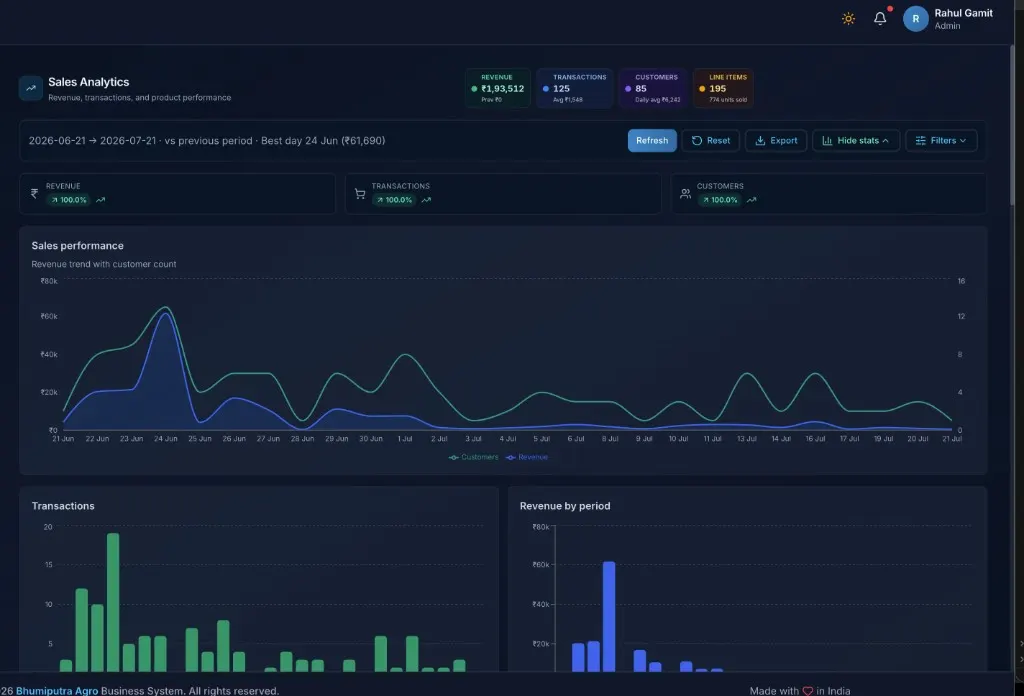
Today's and this month's sales in charts. How many bills, how much money, how many customers. Compare 7 days / 30 days / month / year.
More detail →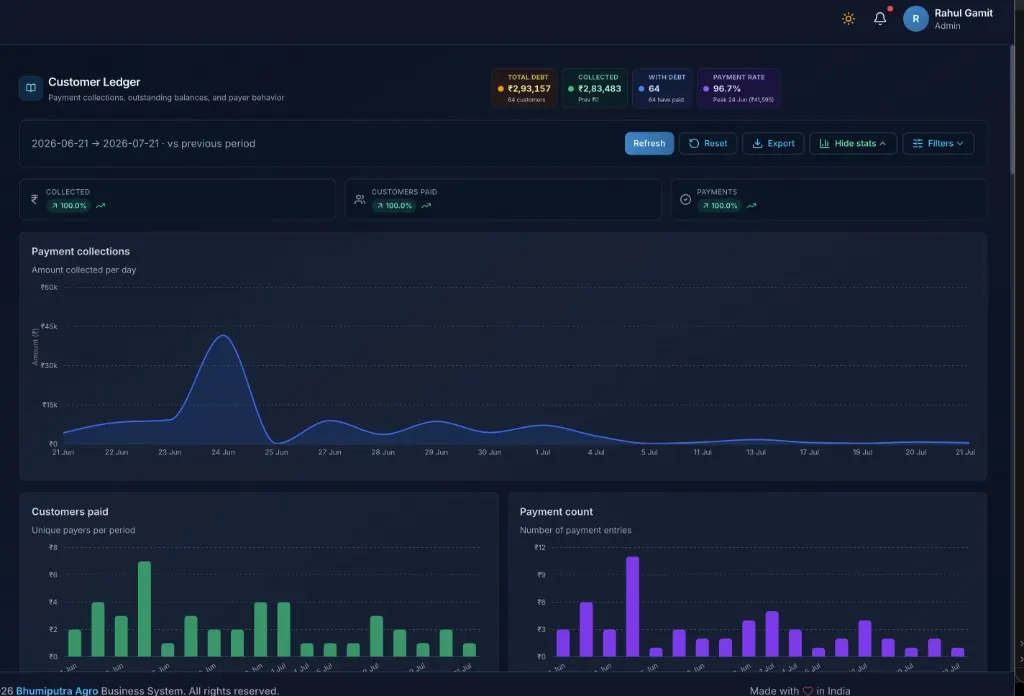
Who paid, who is pending. Full account for each farmer. Very useful for village credit customers.
More detail →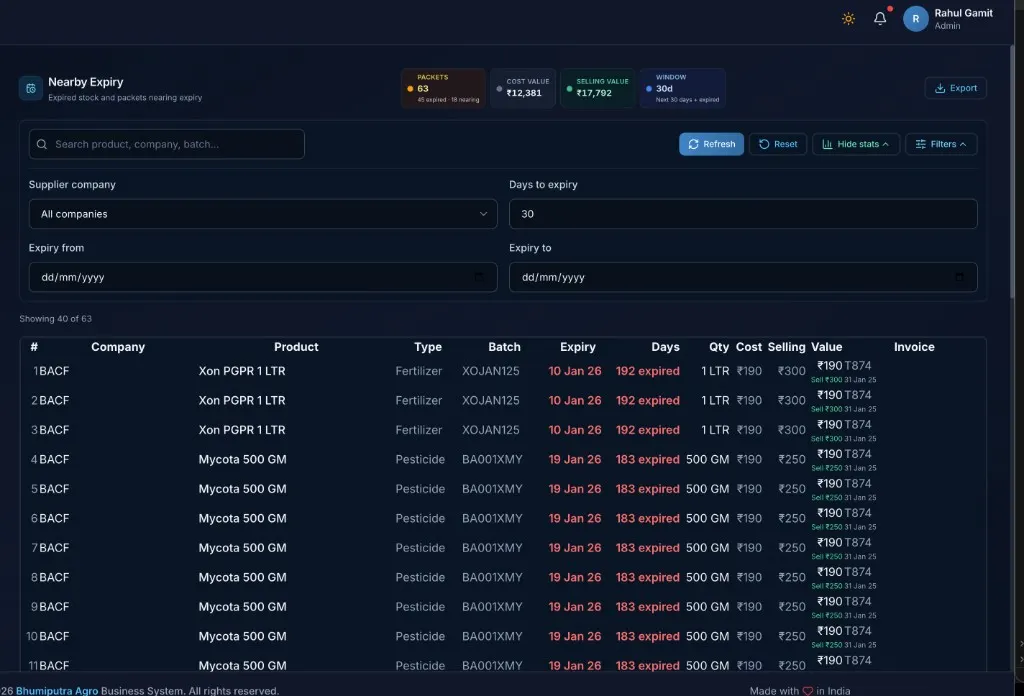
Packets already expired or expiring soon. Sell first or return to company — before loss.
More detail →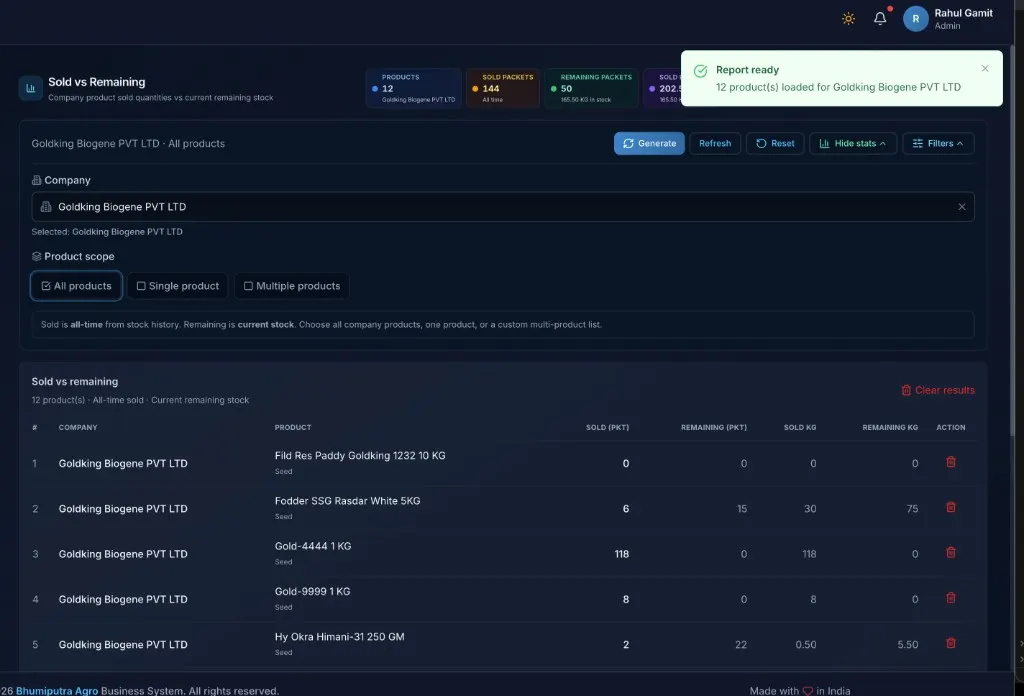
Per company product: how much sold, how much left in stock. Helps plan the next order.
More detail →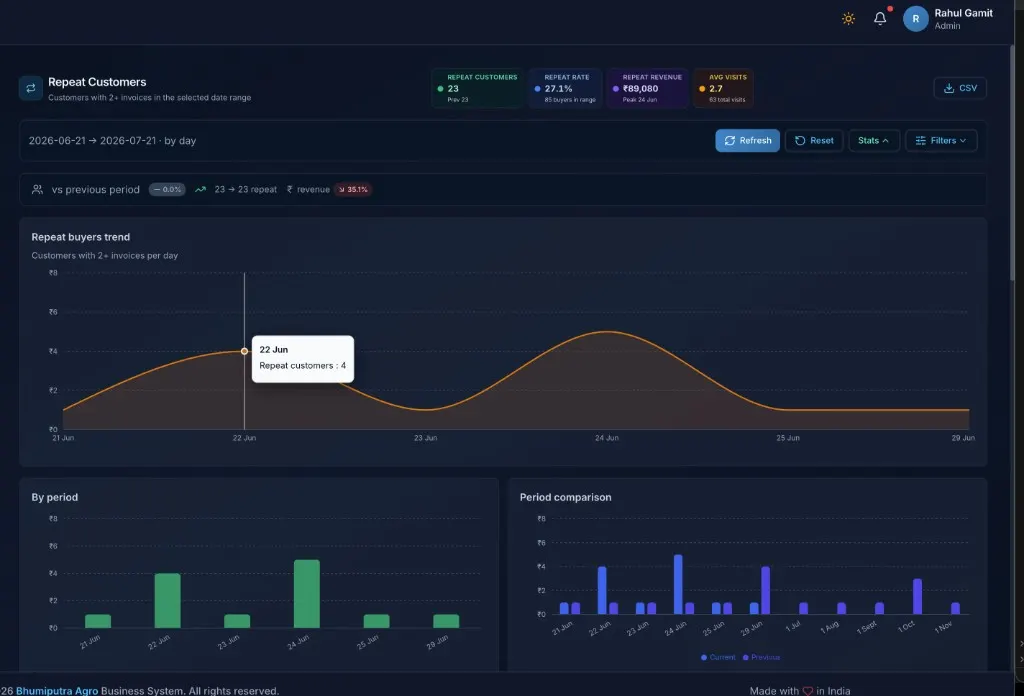
Which farmers come back again and again. Strong relationships show first — easier planning.
More detail →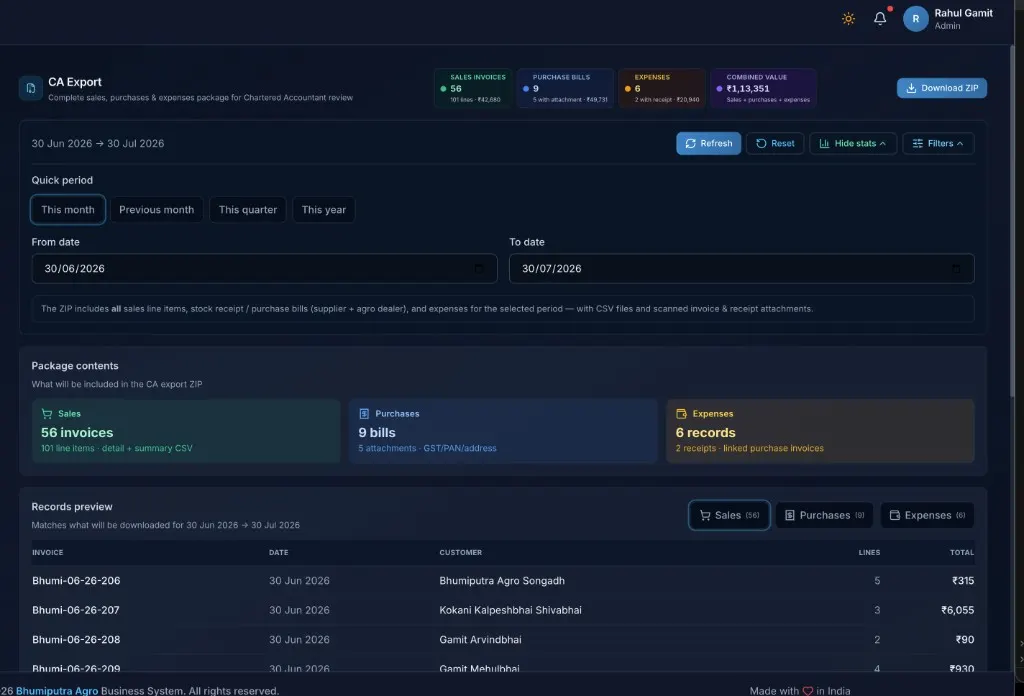
One ZIP for CA: sales + purchases + expenses. Choose date range. Less month-end stress.
More detail →Live demo preview
Sample dealer dashboard. Numbers move for demo purposes. After setup you will see your real sales, stock, and collections. Prefer clicking the real app? Open the full ERP demo ↗
Revenue, transactions, and product performance · demo shop
Browse by area
Open any area — demo charts, sample reports, simple detail.
Add Sale, WhatsApp bill, Main Bill/PDF, returns, top products & profit.
View details →Farmer credit, outstanding dues, repeat buyers, full ledgers.
View details →What you owe companies and agro dealers — clear balances.
View details →Stock position, low stock, expiry alerts, returns & orders.
View details →Shop expenses by category — plus one-click CA ZIP.
View details →Dashboard plus 25+ report screens built for agro dealers.
View details →How to get started
Request → talk → payment → private AgroKhata™ link ready.
On this website enter shop name, phone, address. One open request per phone / email.
Team explains the plan, clears doubts, confirms shop details.
Installation: ₹2,999 / mo, ₹8,499 / 3 months, ₹15,999 / 6 months, or ₹29,999 annual. Renewal later: ₹999 / mo, ₹4,999 / 6 months, or ₹7,999 annual.
Username, password, and your private shop link. Then start billing.
Price
Pay monthly for easier cash flow, or pay once a year and keep the savings in your shop.
New shops
Includes setup and onboarding. Choose monthly, every 3 months, every 6 months, or save when you pay for the full year upfront.
Pay once — installation + 12 months
₹29,999 / first year
Save ₹5,989 vs monthly
Monthly totals ₹35,988 (₹2,999 × 12). Pay annually and keep ₹5,989 in your shop.
Pay for half the year, then continue
₹15,999 / 6 months
After 6 months, pay ₹15,999 again to continue for the next 6 months (₹31,998 for a full year in two payments). Installation included.
Pay every quarter, then continue
₹8,499 / 3 months
After 3 months, pay ₹8,499 again to continue (₹33,996 for a full year in four payments). Installation included.
Spread the cost across the year
₹2,999 / month
₹35,988 over 12 months. Same installation and ERP access as the annual plan.
Existing shops
Continue on the same shop URL with your data intact. No re-installation — choose monthly, every 6 months, or save with an annual renewal.
Pay once for another 12 months
₹7,999 / year
Save ₹3,989 vs monthly
Monthly totals ₹11,988 (₹999 × 12). Pay ₹7,999 once and keep ₹3,989 in your shop.
Pay for half the year, then continue
₹4,999 / 6 months
After 6 months, pay ₹4,999 again to continue (₹9,998 for a full year in two payments). Same shop URL and data.
Continue month by month
₹999 / month
₹11,988 over 12 months. Same access — easier cash flow after year one.
Request access
Fill the form below. We will call or WhatsApp you. A second open request from the same phone / email will not be created — your first request stays in the queue.